Fixing Cross-Terminal Preview Rendering in a Rust TUI

One of the stranger bugs I have hit recently came from a nice reminder that terminal programs are only simple right up until they are not.

lsv has a preview pane. For text files it is straightforward enough: run a command like bat, capture the output, render the ANSI colour, and fit it into the pane. For images I had been using viu, which works well in a lot of setups.

What I Learned Shipping lsv to Crates.io

I have shipped plenty of software inside teams and companies, but publishing a small tool to crates.io has a different feel to it.

lsv is a three-pane terminal file browser I built in Rust with Lua configuration. By the time I started thinking seriously about crates.io, the core idea already worked. I could move around, preview files, run commands, wire up custom actions, and generally use it for real. I had convinced myself the software existed.

From Solver to Product: Evolving a Sudoku Tool into a Better UI

The first version of the Sudoku project solved puzzles. That was the easy part.

The harder part was making it pleasant to use.

The repo history for this one is fairly honest. On January 30th I had:

working version in 1 prompt, pretty version in 2 more prompts

That got me over the line into “there is a thing on the screen and it sort of works”. It did not get me to a tool I would keep open and use.

Making a Rust Roguelike Work in the Browser

I have a Rust roguelike that ran on desktop. I wanted it to run in the browser as well.

That sounds straightforward until you actually try it.

The game itself was not really the hard part. It already existed. The work was in getting the build chain, the dependencies, and the browser shell to agree on what “working” meant.

You can see the code and the working game, and the original tutorial which is really good:

Rogue in Rust with ECS + WebAssembly

I have been following the Rust Roguelike Tutorial to build a little Rogue-like with an ECS core. I only got partway through, but it was a fun, focused project and I now have a playable build running in the browser.

Try it here: Rogue.

It is a classic tile-based dungeon crawl with keyboard controls (arrow keys, vi keys, and numpad). The Rust core uses specs for ECS and bracket-lib for the terminal style rendering model. I bridged it to the browser with wasm-bindgen, so it runs as a WebGL canvas.

Building a Sudoku Editor with GPT-5.2

I wanted a Sudoku editor that feels like a quiet desk: place numbers, track candidates, get nudges, and keep the board readable. So I built one with GPT-5.2 helping me iterate the UI and logic.

You can try it here: Sudoku Editor.

  • 9x9 editor with keyboard navigation, input validation, and clear visual feedback.
  • Candidate mode with a manual pencil-mark layer, plus optional auto-candidates.
  • Generator with difficulty targets (easy/medium/hard) and uniqueness checks.
  • Step solver with hints and a log that explains the tactic used.
  • Quality-of-life actions: New, Reset, Undo, Copy, Load.
  • The board reacts quickly. It highlights row/column/box, matches values, and invalid cells without feeling noisy.
  • The candidate system has two layers: manual marks you place and auto-candidates the solver derives. You can flip between them without losing your notes.
  • The step solver does not just fill cells; it shows the reasoning and keeps a trail so you can walk back through the tactics.

The solver starts with the basics (naked and hidden singles), then escalates through sets, pointing/claiming, fish, and wing tactics. I wanted the hints to be helpful rather than magical, so each step reports the evidence in plain language.
Adding Tactics to a Sudoku Solver Without Turning It Into a Mess

One of the nice things about Sudoku solvers is that they scale badly in an interesting way.

The first steps are easy. Naked singles and hidden singles are not much trouble. You can get a working stepper quite quickly and it feels good because the board starts moving.

But then you need to add the trickier tactics.

The code and the playable version are here:

The main thing that kept this manageable was forcing every tactic through the same output shape.

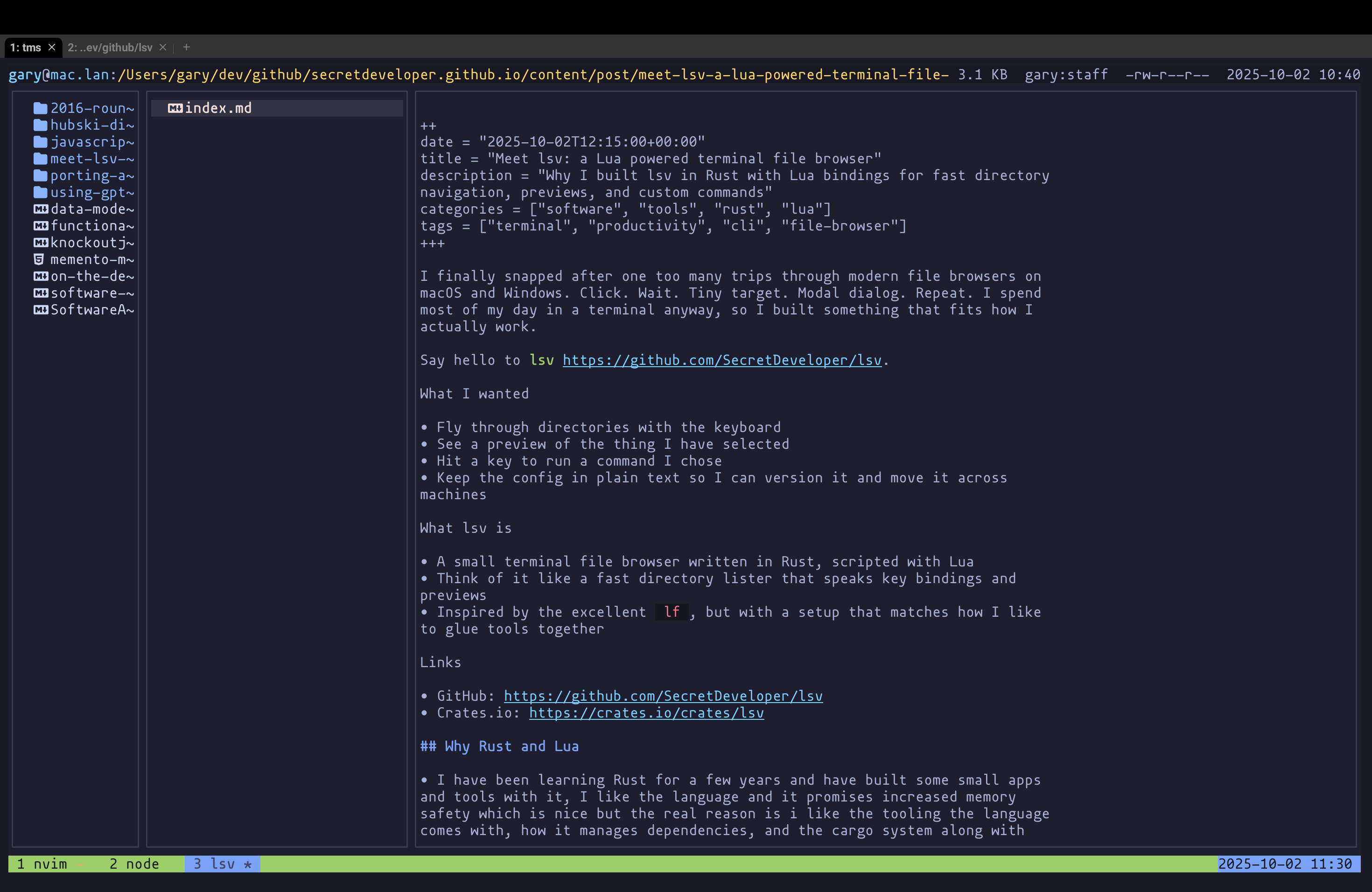
lsv: a Rust powered terminal file browser

I finally snapped after one too many trips through modern file browsers on macOS and Windows. Click. Wait. Tiny target. Modal dialog. Repeat. I spend most of my day in a terminal anyway, so I built something that fits how I actually work.

lsv

Say hello to lsv.

  • Fly through directories with the keyboard
  • See a preview of the thing I have selected
  • Hit a key to run a command I chose
  • Keep the config in plain text so I can version it and move it across machines
  • A small terminal file browser written in Rust, scripted with Lua
  • Think of it like a fast directory lister that speaks key bindings and previews
  • Inspired by the excellent lf, but with a setup that matches how I like to glue tools together
  • I have been learning Rust for a few years and have built some small apps and tools with it, I like the language and it promises increased memory safety which is nice but the real reason is i like the tooling the language comes with, how it manages dependencies, and the cargo system along with crates.io for distribution.
  • Lua keeps the configuration simple and flexible without writing a plugin system

You can bind keys to run shell command. e for example might launch the selected file in your $EDITOR or i use t to launch a new tmux pane for the current directory, or gs which is bound to lsv.os_run("git status -C {current_dir}") to see the results in a results window.

Porting Asteroids to an ECS with Codex

Quick version: I rewired my Asteroids clone from a pile of classes to an Entity‑Component‑System (ECS). Codex (the CLI agent) did the heavy lifting while I poked, prodded, and occasionally muttered at my screen. The end result is cleaner, easier to extend, and less brittle when I add toys like missiles and sparkly shields.

Why bother with ECS?

  • I was done fighting class hierarchies. I just want to slap “has a shield,” “spins,” or “is a missile” onto things without negotiating with a base class.
  • Data is data, behavior is behavior. Components hold state; systems do the work over sets of components.
  • (maybe) Performance as a side effect: tight loops over similar data are fast, but honestly the clarity is what sold me.
  • New features become “add a component, tweak a system,” not surgery across five files.

Where I started (a.k.a. the creaky bits)

Designing a simple Queue: Building sqew with SQLite and Axum

The basic idea was simple enough. I wanted a small message queue service with HTTP and JSON, backed only by SQLite. One binary, one database file, no extra infrastructure, something that theoretically would be useful for small jobs and side projects without Redis, RabbitMQ, or a whole second system to babysit.

The repo is here if you want to look at it:

The implementation settled on a fairly tight stack: